Getting a Simi Valley flower shop's ad budget to show its return
One broad Smart Campaign, all traffic to the homepage, nothing tracked. After a rebuild around products and delivery areas: $3,691 in tracked online revenue and 21 calls in 60 days.
Results
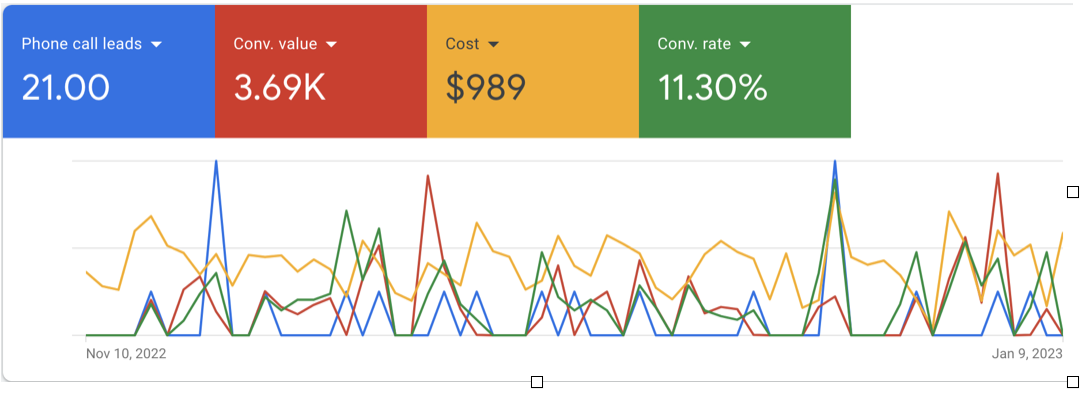
- Tracked online revenue in 60 days
- $3,691
- Phone call leads
- 21
- Ad spend
- $989
The problem: spend with nothing to show for it
This Simi Valley, CA florist had one Smart Campaign running with no real targeting plan. Every click went to the homepage, not to the arrangement or delivery page the person was looking for. Nothing tracked online orders or phone calls, so there was no way to say what the ad budget was earning.
Someone looking for same-day delivery nearby and someone looking for a specific arrangement want different things. One broad campaign treats them the same, and that’s where budget leaks.
The fix
We started with local keyword research: what people in and around Simi Valley actually type when they want flowers. Then we rebuilt the account around it.
- Small, focused ad groups by floral product and delivery area, so each search gets an ad that matches it.
- New ad copy and calls to action, leading with what makes the shop different, like being local, family owned and offering same-day delivery.
- Location targeting, ad extensions and scheduling rebuilt around the same research.
- Tracking on online orders and calls, so results show up in the account instead of disappearing.
What changed
Over the first 60 days, $989 in ad spend brought in $3,691 in tracked online revenue and 21 phone call leads. The old Smart Campaign had been producing a handful of untracked leads a month.
Better targeting helped, but tracking is what made it visible. Calls and online orders that used to go uncounted are now right there in the numbers.
Project photos
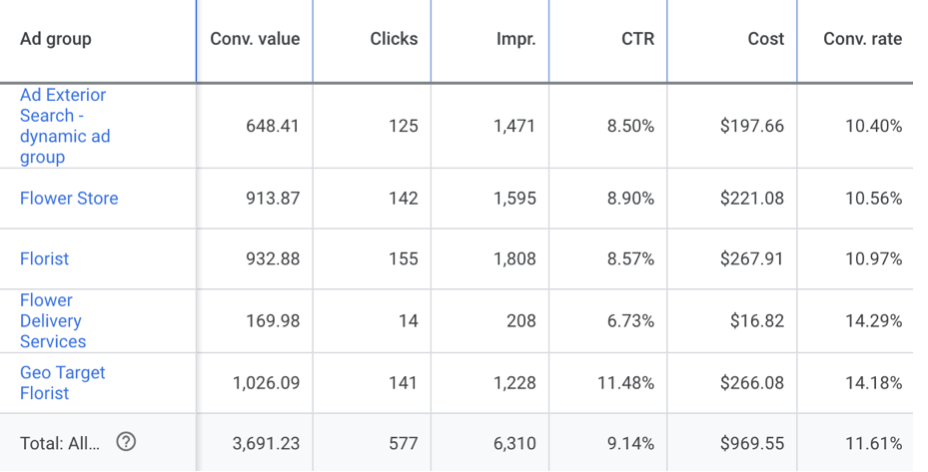
Five small ad groups, each matched to a different kind of flower search. 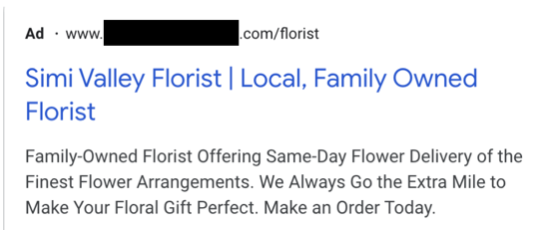
An ad from the new account, leading with what makes the shop different.